Sunday, March 29, 2009

Last.fm-Listen to any music aswell as radio online for free.


Last.fm is a music website based in the United Kingdom. Last.fm is an internet radio station and music community site. The web site has over 30 million active users from over 200 countries making it the world’s largest social music platforms around today. On 30 May 2007, CBS Interactive acquired Last.fm for $280m USD.

Last.fm uses an advanced program called audioscrobbler, this program builds a detailed profile of each user's musical taste by recording details of all the songs the user listens to. It does this by checking what music you are listening to on last.fm or by taking music from your audio devise and then identifying what music you listen to. Audioscrobbler then takes all the information it has of you and automatically finds out what you might like and then creates a music profile for you.

After you have registered users can create a custom Radio station with all their favorite music and share it with the world.

If you want to listen to music off the internet this site is for you! You can find new bands that are similar to bands you like and then say if you like them or not. If you looking for a new band or want to listen to the latest album last.fm will be able to find it and have it.

Because of the advanced features on last.fm and the easy to use service this site has made it into the on-his-mind best sites online list!

For more information on last.fm please go to http://en.wikipedia.org/wiki/Last.fm
To go to the last.fm web site please go here http://www.last.fm/

Microsoft office live-Microsoft's Web-based office software


A few days ago we featured a site called Google docs which is an online based office tool. Because of goggles success in their web based tool Microsoft followed suit creating a similar service for their Live members called office live.

Office live is almost a replica of Google docs. Office live allows live members to store and share Microsoft office documents on the internet. This is very handy for backing up important data or if you want to accesses it on another computer through the internet. The sharing feature allows you to share a document with other users, you do this by selecting the user yourself. This means that you choose who sees your files and who doesn’t.

Office live consists of two services namely Office Live Workspace and Office Live Small Business In this article we are going to describe to you exactly what the difference between the two services are, we do this so you can decided which one will fit your needs.

We are first going to start with Office live workspace. As mentioned above office live workspace’s main feature is that it allows users to store and share documents online anywhere in the world for free. You can access your office live workspace vie the internet ether using their website or directly from Office Word, Excel and PowerPoint by installing an Office Live Update extension .Although you can view documents online you cannot change or edit them on the site, instead you have to download the document onto your pc and then edit it in the correct office client for example word or excel. With office live workspace you get up to 5 Gigabits of storage, this means you don’t have to carry a flash stick or CDs around with you but instead all you have to do is upload data to the site and then when it needs to be accessed elsewhere all you do is login to your Office live account and download them.

The biggest disadvantage to using office live workspace is the fact that you can’t edit the files online like other online web based office software like Google docs.


Office Live Workspace

Office Live Small Business
Microsoft Office Live Small Business is an Internet-based service that allows users to create a professional looking website without needing any knowledge of design or technical skills.

Office live small business has multiple features for people that are wanting to create and own a website. These features change often and price structure may be implemented at any time. For these reasons we do not go into it thoroughly.

You can access office live from the following link http://www.officelive.com/

In my opinion Google docs is much more better and powerful because you can do everything on the site itself and you don’t have to download extenuations for office and you can edit docs online from anywhere whether you have office installed or not.For these reasons office live ARE NOT on ow best sites online list.

If you would like to find out more about both Office live small business and office live workspace visit the wiki page at http://en.wikipedia.org/wiki/Office_Live

Friday, March 27, 2009

The 2rd best online FPS of all time-call of duty 4


Welcome to the 4th instalment on the top 5 online games of all time! In this article you will find out what game we think is the 2nd best online FPS of all time!

2. Call of duty 4

Call of duty 4:modern warfare also known as COD4 developed by Infinity Ward and published by Activision for Mac OS X, PlayStation 3, Windows, and Xbox 360 is an amazing online FPS! The game was first released in November 2007 and is the 4th Call of duty game.

It toke the COD4 developers 2 years to complete using a proprietary game engine. Call of Duty 4 features team-based and death match-based multiplayer modes on various maps. Each mode has an objective that requires unique strategies to complete. Players can change their guns as they unlock new ones and then upgrade their guns and mod them too exactly how they want them.

In call of duty 4 if you get a certain amount of deaths without dying you can do certain things like call in air strikes and much more.

If you are looking for an action packed game that is easy to get into and has a huge competitive gaming scene then COD4 is the Online FPS game for you.

For more information on owe 2nd best FPS online game of all time please go to http://en.wikipedia.org/wiki/Call_of_Duty_4

Stay with us while we count down to the Top online FPS game ever made and played!

Google Docs-Web-based office software that you cant live without.


Have you ever asked yourself what you would do without Google? Well I have, and the answer is nothing, without Google I would do nothing. I use almost every Google application I can get hold of and one of those is a nice little thing called Google docs.

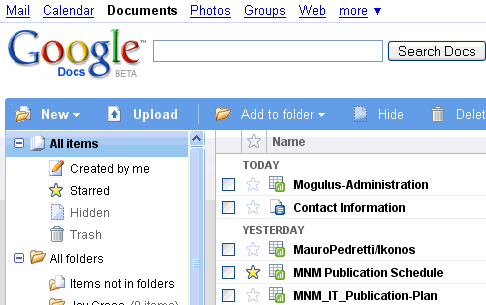
Google Docs is an online word processor, spreadsheet, presentation, and form application Hosted by Google for free. Google Docs allows you to create documents and then edit them on the site. You can also upload Microsoft office documents onto Google docs and you will be able to edit them in Google docs as well as save them. You are then able to access them at any time elsewhere with an internet connection.

A Google doc also has a feature that allows you to collaborate your documents. This means that you can share your docs with your friends or co workers and all parties can edit the document at the same time.

You can access Google docs on your mobile phone and you can send documents vie email. You can also download the documents to your PC so you can open them in Apps like Microsoft office and open office. If I have important Documents that I want to backup I often upload them to Google docs and save them there.

The Google docs interface is almost exactly the same as office is but the fact that you can save data online and access it from both work and home is just awesome.

If you would like to find out more about Google docs go the wiki page on it at http://en.wikipedia.org/wiki/Google_Docs
Or if you would like to watch online tutorials on how to do things and more go to
http://www.expertvillage.com/video-series/4204_google-documents.htm

Stick around wile we uncover more online office tools just like Google docs!

Tuesday, March 24, 2009

Watch free shows,movies and more online with hulu


We all know about YouTube and how it’s a site where anyone can upload videos and anyone around the world can watch the videos other users have uploaded for free. The problem with youtube is that you can’t watch the latest episode of heroes or the family guy but with hulu.com you can.

Hulu is an online video service that offers hit TV shows, movies and clips on their site at www.Hulu.com/ . Founded in March 2007, Hulu is co-owned by NBC Universal, News Corp. and Providence Equity Partners. It is operated independently by a dedicated management team with offices in Los Angeles, New York, Chicago and Beijing.

Hulu says that their mission is to provide a free service that allows users to watch videos anywhere in the world. Unfortunately though as mentioned above Hulu can only be used in the United States but soon hopefully this will change.

Hulu brings together a large selection of videos from more than 130 content providers, including FOX, NBC Universal, MGM, Sony Pictures Television, Warner Bros. and more. Users can choose from more than 1000 current primetime TV hits such as The Simpsons, The Daily Show with Jon Stewart and The Office the morning after they air, classics like Buffy the Vampire Slayer, The A Team, Airwolf and Married...with Children, movies like Men in Black, Ghostbusters, and The Karate Kid, and clips from Saturday Night Live, Friends and other popular TV shows and movies.

Hulu videos are available on AOL, Comcast, MSN, MySpace, and Yahoo! in the U.S. as well as a growing network of personal blogs, fan sites, and other Web sites where users choose to embed the Hulu video player.

If you are in the US this site should be on your check list for the next time you looking for that episode you missed, because you will simply be able to go on and watch it straight from your pc!

For more information on hulu or to just check it out go to www.hulu.com/


Unfortunately I have never been able to watch hulu videos due to me being in South Africa but I have heard from a number of people about how effective it is if you have a good enough internet connection speeds.

Secure online file hosting for free-Box.net


Have you ever needed a file that is on your pc at home when at the office or at a coffee shop with your laptop? Everybody needs some where to upload important files and content to the internet to get latter from anywhere in the world.

We here at on-his-mind have found a secure site that allows you up to 1GB of free data to be stored on their site. A site called box.net simplifies online file storage which ultimately replaces old FTP file systems and allows you to back up important data.


If you need more data for backups you can pay for an added service which allows you to upload much bigger files as well as much more space on faster servers.

Box.net is the ultimate site for backing up important data. It is simple to use and any one can get an account for free. With box.net you can also share your files and collaborate your files with other people you allow to access your data.

For more information on box.net go to www.box.net/

Monday, March 23, 2009

expert village:learn how to do almost anything for free.


Have you ever wanted to build your own pc but don’t know how or to learn how to play guitar but don’t have money for guitar lessons? Well we here at On-his-mind have found a site that has over 120 000 videos dedicated to teaching you things! From business law to emailing, from car auto repair to planning the weeding of your dream this site has got it covered! And best of all it’s all completely free.

We are talking about a site called expert village. Watch how to videos and video clips at Expert Village, where you can learn just about anything.

Go to expert village at www.expertvillage.com and you will be amazed at how experience and helpful the videos are on this site.

How IRQ(interrupt requested line)works

An IRQ or interrupt requested line is a Line to your CPU that other devises like mice can if needed interrupt the CPU. In other words if your CPU(the devise that processes everything on your computer)is working on a Task that is not as important as something like moving your mouse, The IRQ will tell your CPU to stop the unimportant task and do the more important one first which in this case is the mouse. The IRQ will then process the more important task and then after that task is complete will go back to the old task that was not as important.

IRQ are always hardware related. There are some IRQ that are preset by the manufacturer. The system timer which uses IRQ0, Keyboard controller which uses IRQ1, floppy controller which uses IRQ6, real-time clock which uses IRQ8 and the Math Co-processor which uses RQ13 all are set by default and cannot be changed. The rest of the IRQ are often set by the PC user themselves, Users change IRQs ether by setting jumpers on the Hardware itself or by using programs installed on the computer.

IRQ2 cascades to IRQ9 and IRQ9 cascades back to IRQ2.In the older XT BIOS there was only 8 IRQ lines but on the newer AT BIOS they added 8 more lines so that there were more IRQ lines available to send IRQ .IRQ2 gets its interrupt requests from IRQ 8-15 and then IRQ2s instructions are redirected to IRQ9.If you set a devise to use IRQ9 then that interrupt request cascades to IRQ2 so actually IRQ9 just sends the Interrupt request to IRQ2 Just like IRQ2 sends its interrupt requests to IRQ9 when it receive the data from IRQ8-15.Just take into account that if IRQ2 is being used.

basic Infomation on keyboards


A Keyboard is a Devise that you type information into so it can show up or do a task on your pc. The keyboard plugs into your motherboard by ether USB or a designated PS2 port which is specifically for Keyboards only.

The keyboard has an arrangement of different keys or buttons that have letter on it, if you press a letter it will send that letter as data to your PC and your PC will pick up what letter you pressed. Your computer will then process that letter and it will type it down or do a certain function.

For more information on keyboards and how they work please go to:http://en.wikipedia.org/wiki/Computer_keyboard

Basic Infomation on computer Mouses(Mice)


A mouse is a computer devise that plugs into your computer, the mouse is like a pointer for your computer. A mouse allows you to navigate around your computer and do tasks like opening internet explorer or exploring the internet.

Mouses are also called mice. Generally a PC mouse has 2 buttons, these buttons allow you to click on objects on your desktop or computer. Some apple Mac mice only have 1 button. Some mice have extra buttons and most commonly today you will find mice with a scroll wheel which allows you to scroll down pages faster.

You get many different mice, here is a list of some of the mice you get.
- Infra-red Optical mice
- Laser mice
-Mechanical Mice

Creative Commons License
.